

The concepts behind what you did
You’ve now drawn a complete schematic in one editor, then turned it into a real board layout in another, all the way to files a factory could build. You did it by following along, which is a great way to learn. In the last two chapters I asked you to act first and understand later.
Now let’s close the loop. This short chapter explains the “why” behind the actions you just performed. You will learn about the handful of ideas that turn KiCad from a set of buttons you follow into a tool you understand. Understanding these ideas is fundamental on everything you will do with KiCad (or other PCB programs) going forward. I’ll keep each idea brief and point you to the Mini Encyclopedia at the back of the book whenever you want more depth.
Why KiCad splits the work in two
The first thing to notice, looking back, is that you used two separate programs to make one board. You drew the circuit in the Schematic Editor, saved it, and then moved to the PCB Editor to lay out the physical board. Two editors, two files, two distinct jobs.
If you’ve come from another design tool, or from drawing circuits by hand, this split is the single thing most likely to trip you up at the start, especially if you are coming from a different PCB program.
The schematic and the layout answer two completely different questions:
- The schematic answers what connects to what. It’s a diagram of your circuit’s intent. It does not care where anything physically sits, how big the board is, or which way a chip faces. Move a symbol across the sheet and you’ve changed nothing electrically; you’ve just tidied the drawing.
- The layout answers where everything physically goes. It’s the real board. It contains the copper of a real width, parts in real positions, holes of a real size. Here, where things sit matters enormously.
KiCad keeps these two worlds in separate editors on purpose, and it connects them with a one-way flow you already used without me drawing attention to it. You design the schematic first, then tell the PCB Editor to “Update PCB from Schematic” (Figure 4.1). The schematic is the source of truth. The layout follows it. You don’t draw your connections twice; you declare them once, in the schematic, and the layout inherits them.
This is where newcomers stumble. People expect one drawing surface where moving a part also moves its wiring, or where dragging a copper track changes the circuit. KiCad doesn’t work that way, and once you stop expecting it to, your work will accelerate. The separation buys you real advantages:
- One schematic can become many different layouts. The same circuit might be a small round board today and a long thin one tomorrow, with no change to the underlying design.
- KiCad can check each world on its own terms (more on that below), catching logical mistakes in the schematic and physical mistakes in the layout separately.
- Your design intent never gets lost in the physical details. The schematic stays a clean, readable record of what the circuit is.
Other PCB packages make different choices, and some blur the line more than KiCad does. KiCad’s clean split is deliberate, and it’s the same split nearly every professional tool settles on once a design gets serious. Treat the schematic as the truth and the layout as its physical realisation, and the rest of this book will feel natural.
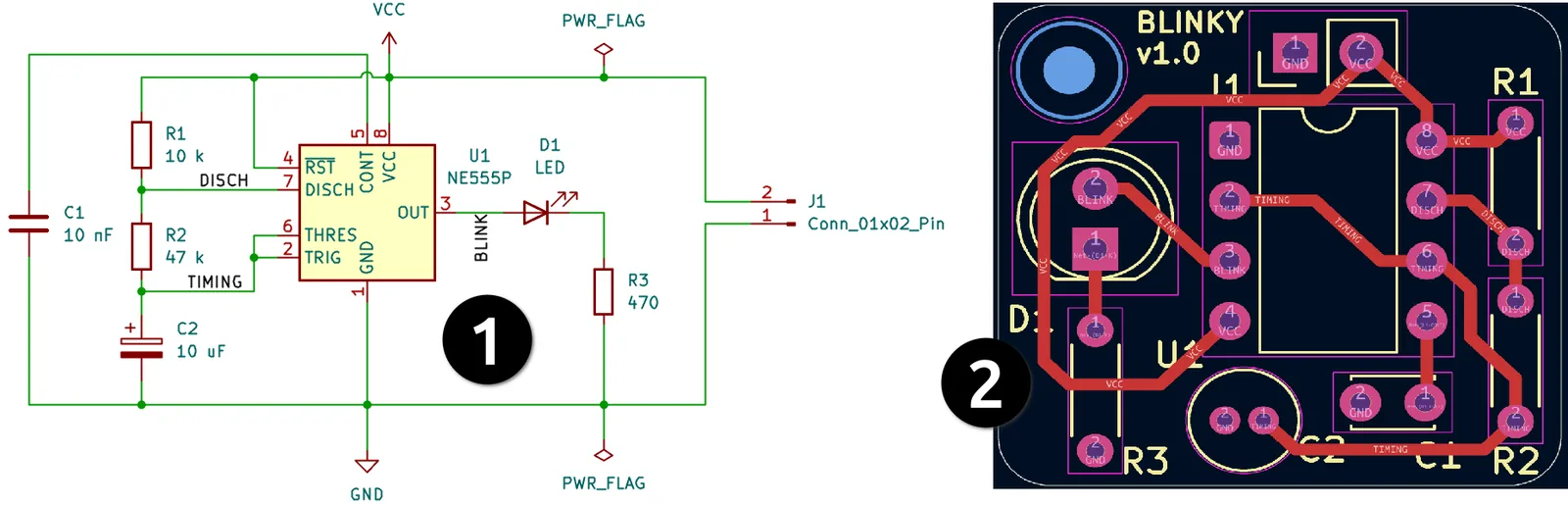
Figure 4.1: The same blinker, shown as two separate worlds. The schematic (1) captures the design intent; the routed board (2) realises it physically. Information flows one way, from schematic to layout.