
In Volume 1 you learned to find the symbols and footprints you needed. You searched KiCad’s built-in libraries, you pulled parts from reputable online repositories, and you managed them in your library tables. That is the standard sourcing tree where you will be able to find almost every part you will ever place. In my work, I rarely ever have trouble finding a part I need, unlike in the early few years of KiCad, where the built-in library was small and online repositories only supported established CAD applications. Despite this, sooner or later you will want a component that you can’t find anywhere, in which case you will have to design the part yourself. That’s the skill this chapter teaches, and it is the first thing that makes Volume 2 a book about producing rather than consuming.
You will learn this new skill in a hands-on way. We will author the symbol we’ll need in the capstone project, the ‘DRV8833’ dual H-bridge motor driver, so that by the time you reach that capstone, the part will be available in your own library. The DRV8833 is an excellent first symbol to draw because of its diversity. It has sixteen pins (plus one, as you’ll see), which gives this work a realistic complexity. Those pins fall into several functional groups, which makes arranging them on the symbol an excellent sub-exercise in its own right (Figure 1.1). I will work from the manufacturer’s datasheet throughout (https://www.ti.com/lit/ds/symlink/drv8833.pdf), because the datasheet is the single source of truth for what the pins are, what they are called, and what they do. Before you author any part, always download its datasheet and keep it open beside you.
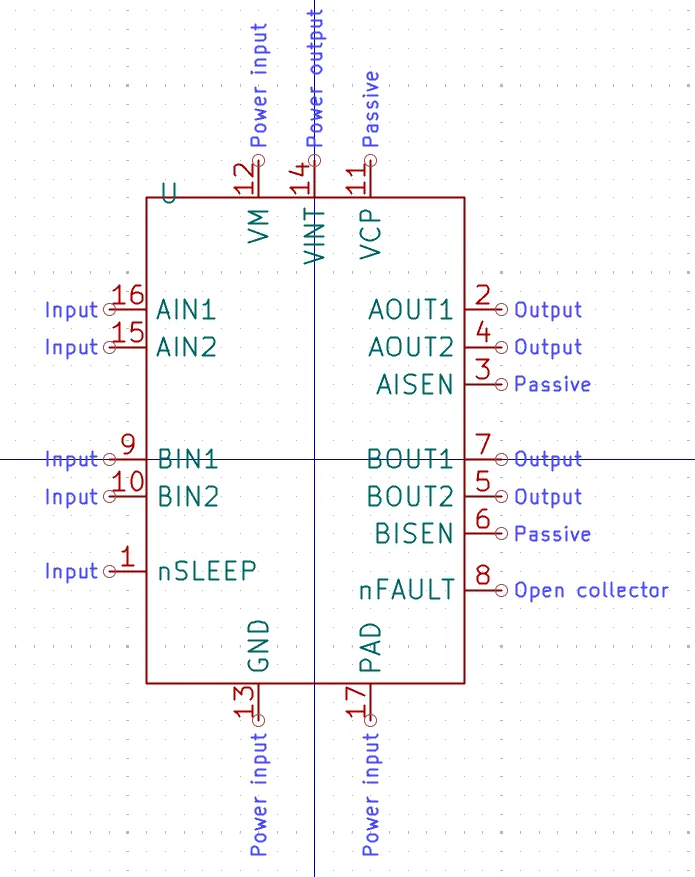
Figure 1.1: Where this chapter is going: the finished DRV8833_PD symbol. The four logic inputs and “nSLEEP” run down the left edge, the two bridges’ outputs and sense pins are grouped on the right with the “nFAULT” flag below them, “VM”, “VINT” and “VCP” sit along the top, and “GND” and the thermal “PAD” leave from the bottom. The text outside each connection point is the pin’s electrical type, and the number above each pin line is its package pin number.