

You have a finished design and a bill of materials to build it from. The last question is whether a factory can actually make what you have drawn, and make it efficiently. This chapter answers it. The term ‘Design for manufacturing’, usually shortened to DFM, covers two related practices. First, checking a board against the real limits of the process that will fabricate and assemble it, before you pay for a batch of boards that cannot be built. And, second, shaping the design so that the board is quicker, cheaper and more reliable to build once it is in the factory.
A design that is electrically correct can still be difficult or even not possible to make. There may be a track that is too thin for the factory’s etching (Etching is the chemical process that removes unwanted copper from the board. The factory protects the copper you want to keep with a resist, then dissolves the rest with an etchant solution, leaving behind the tracks, pads, and pours the design calls for.), a hole too small for its drills, or a thermal pad that floods with solder and tilts the chip at reflow. Knowing a few things about PCB manufacturing is useful here, though you surely do not need to be an expert. In this chapter you will learn how to check a board against the limits your fabricator publishes, how to export the manufacturing files and inspect them before you send them, and how to record those limits inside the project so that KiCad enforces them for you. You will also learn about panelisation (Panelisation is the practice of arranging multiple copies of a board onto a single larger panel that moves through fabrication and assembly as one unit, then is separated into individual boards at the end. It makes small boards economical to produce, because handling them one at a time is slow and wasteful.) and solder-paste stencils (A solder-paste stencil is a thin metal sheet with an opening cut over each surface-mount pad. Laid on the board and wiped with paste, it deposits solder only on the pads, so that components can be placed and the board heated until the paste melts into solid joints.), the two areas where your design choices determine how efficiently the board can be built. The chapter works through all of it on the capstone, because its exposed thermal pad makes the most important of these checks impossible to ignore.
The checking part of that work is a short sequence of checks, and they are not interchangeable. Each check can reveal a larger set of potential issues to fix or improve compared to the one before it, and each requires a little more effort to run (Figure 6.1). The order is what makes the sequence worth having. A problem caught in the first check is fixed in the editor you already have open, while the same problem caught in the last one sends you back through the re-route, the re-plot and the re-upload before you can check it again. We work down that sequence first, then turn to the shaping half.
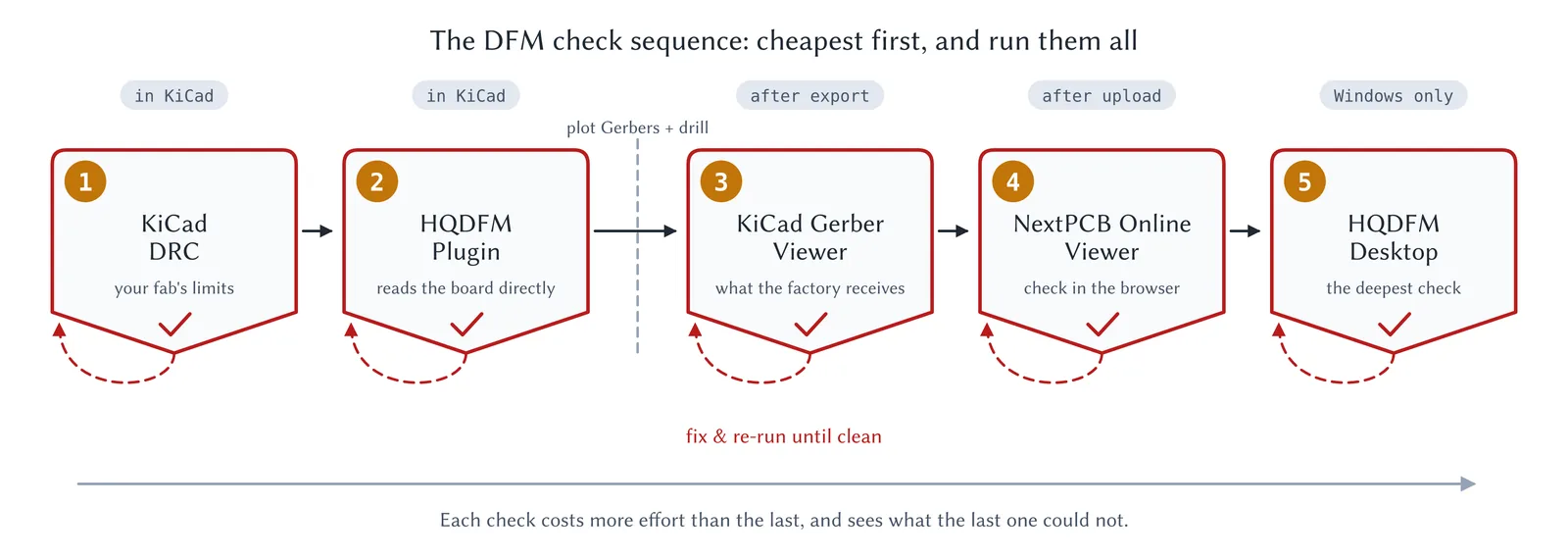
Figure 6.1: The DFM check sequence. Each stage is a gate: fix what it reports and run it again until it comes back clean. Then go on to the next one regardless, because a later check sees things an earlier one cannot. Stages 1 and 2 run inside KiCad with nothing exported; stages 3 to 5 work on your plotted Gerbers.