

This is the capstone of Volume 2. This project gives you the opportunity to put to use everything the volume has taught. Up to this point, each chapter has drilled one skill on its own, be it authoring a symbol, authoring a footprint, setting up net classes, pouring copper, building a bill of materials, or checking a design for manufacture. The last chapter added the layout skills that let you work on a busy board without doing the same job multiple times. Here you bring all of it together on a single original board, and you take that board from a blank project to the files a factory can build.
The board is a small dual H-bridge motor driver built around the DRV8833. It is a useful little board, and it is also, not by accident, an ideal teaching tool. A motor driver carries real current, so net classes and copper pours become the difference between a board that works and one that burns up when you use it for the first time. The DRV8833 also ships in a package with an exposed thermal pad, which provides an opportunity to discuss footprints, solder paste, and heat that a simpler part would let you avoid.
You are about to design a board that, in terms of its component count, is smaller than the one you finished in the last chapter. The LED matrix was wide and shallow. It contains lots of components, most of them identical, all of them sourced from a library, where the difficulty was scale. By contrast, the board in this chapter is narrow and deep. It has few parts, one of which you drew yourself, and the difficulty is that the copper has to carry current, and the chip has to shed heat effectively.
Before any of this board reached the PCB editor, I worked out where every part would sit and drew it (Figure 8.1). This is the same habit the warm-up project opened with, and on a board like this one it pays for itself twice over. It tells you what you are about to build, and it is the drawing I keep beside me while I do the layout.
There is one difference from the sketch in Chapter 7 worth naming, because it changes how much you should trust the numbers. That one was a genuine guess, drawn before the design existed, and only a single dimension on it was fixed. This one is not a guess. By the time I drew it the schematic was finished and I had already worked the placement out against the real footprints, measuring each part’s courtyard rather than estimating it, so every number on the drawing is one you can hold me to. That is why the outline reads 52.0 by 48.0 mm rather than roughly fifty millimetres square.
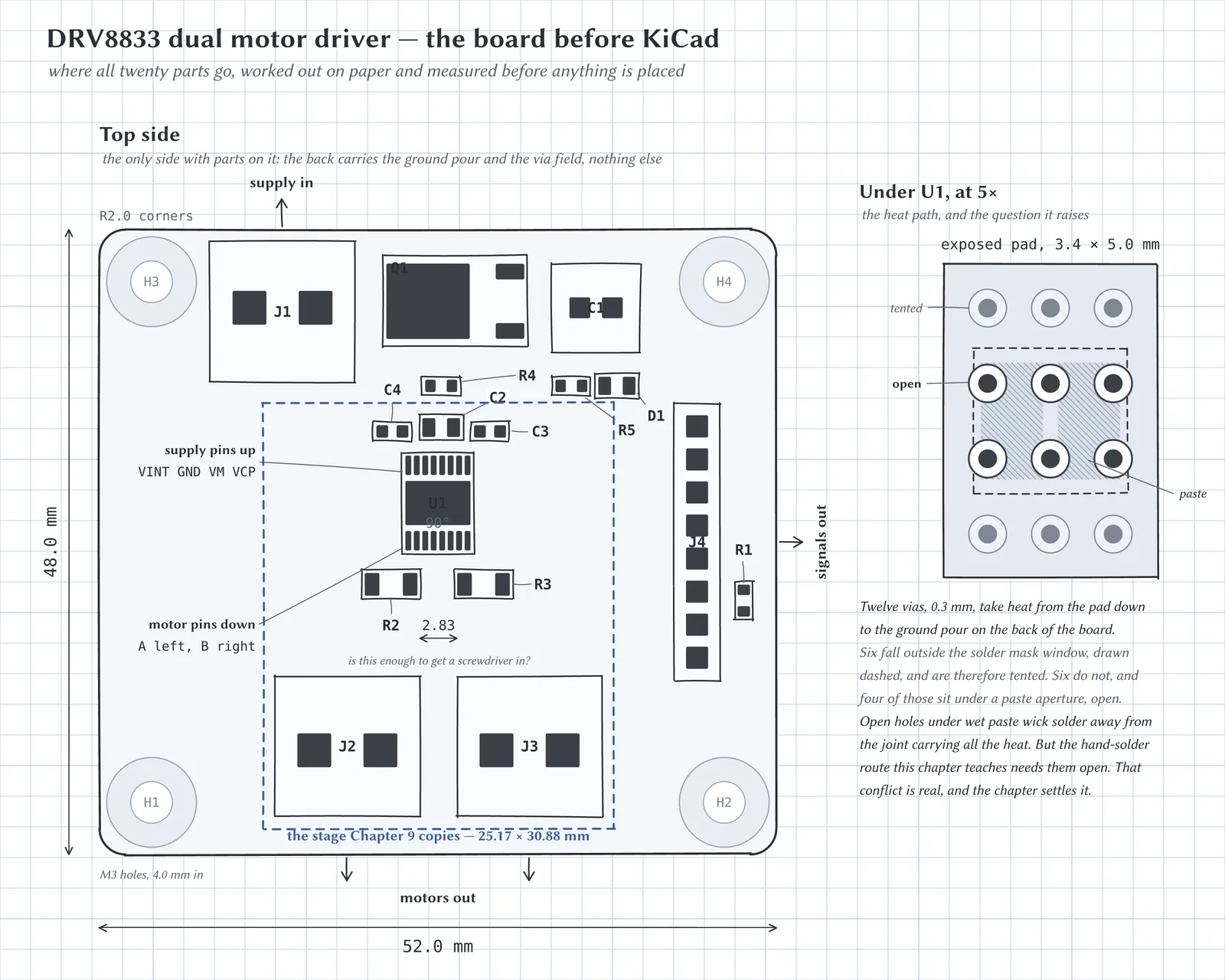
Figure 8.1: The board as an illustration, with every part where it is actually going to go. Only the top side is drawn, because the back of this board carries no components. U1 sits at 90°, which puts its four supply pins along the top of the package and all the motor current along the bottom. The wiring leaves on three different edges, supply at the top, motors at the bottom and signals on the right, so no motor wire ever has to cross the signal side. The dashed rectangle marks the eight parts that make up one driver stage, which is the unit Chapter 9 copies. The inset shows what is underneath the chip, and it is the reason this project has a section about solder paste.
The sketch helps us understand where the components will sit. To help us understand how the current flows, refer to Figure 8.2. Don’t worry about the specific parts for now. What it is worth taking from it now is the current flows. Power comes in on the left and is protected before it reaches anything, a controller’s logic comes in below it, and two motors leave on the right, each drawing a large amount of current. That difference is drawn as line weight. The current difference is also the reason this board needs net classes rather than one default track width.