
This chapter takes the board you finished in Chapter 8 and adds a second DRV8833. The new board will be able to drive a small four-wheeled robot with independent control of each wheel. Almost none of the work you are about to do is new drawing. The driver stage already exists, wired and placed and routed and proven clean, so the job here is to capture it once and stamp it out again (Figure 9.1).
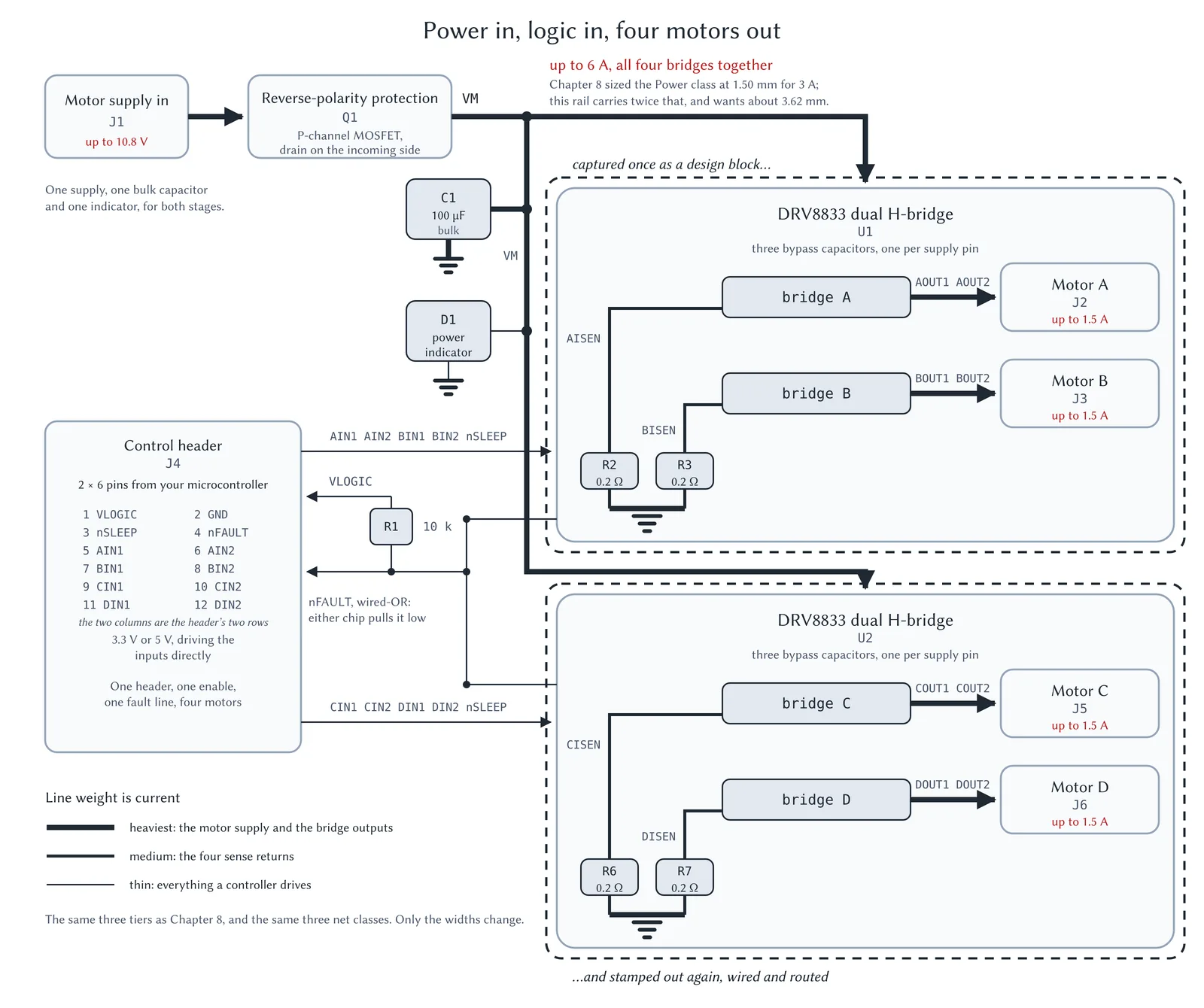
Figure 9.1: The four-motor board has two identical stages that share everything else. It copies and builds on Figure 8.2. The dashed brackets mark the unit this chapter captures and reuses. It contains the eight parts Chapter 8 grouped together for this purpose. All other components are not duplicated, regardless of how many motors the board has.
Start from the board of Chapter 8
Before anything else, do not start a new project. Instead, make a copy of the motor-driver project you finished in Chapter 8, open the copy, and work in that. In this chapter, you will extend the capstone board, not rebuild it.
The main learning objective in this chapter is reuse. You already have a working driver stage. It contains a DRV8833 with its three bypass capacitors, its sense-resistor option, and its motor terminals. What you are about to do is capture that stage as a reusable object and stamp out a second one, exactly as you stamped out three more matrix cells in Chapter 7.
There is an additional benefit in following this process. Once the second stage exists, you can mark it ‘do not populate’ so that the same project produces the two-motor board again. If, later, you want to add the second stage, the board already has the footprints to receive the parts. One project, two boards, one bill of materials for each. That is the design-variant idea from Chapter 5, applied to a whole circuit block.
Learning objectives of this extension
This is an extension and not a new project, so most of the board is Chapter 8’s, built once and then reused. Three things here are new:
- Design blocks that carry copper. Chapter 7 captured a circuit and stamped it out three more times. The block you save here holds the circuit and the layout that implements it, so the second stage arrives placed and routed instead of only wired. Capturing that second half is the one command in this chapter you have not seen before.
- Component classes. A component class is a name you attach to a group of parts so that you can refer to the whole group by that one name. Chapter 3, Board Setup, introduced them on this board in its section on component classes and said the two-motor version could do without them. You need one here for the last section. A class that names the eight parts of the second stage lets you mark all eight do-not-populate in a single step, which is what turns the four-motor board back into a two-motor one, while keeping the ability to add the second stage open.
- A design variant applied to a whole block. Chapter 5 varied a pair of resistors. Here the override covers a complete captured stage, and one project produces both the four-motor board and Chapter 8’s two-motor board.
Of course, reuse is not risk-free. The part, the footprint and the custom rules all propagate through the copy, which is why you must take care to set them up properly. Despite the fact that the first stage is properly setup, there are still two things we will need to fix: the Power class width, which was originally set for a single chip’s 3 A (and now facing 6 A), and the breakout rule’s scope. That rule is Chapter 8’s “U1 fine-pitch breakout”, which relaxes track width and clearance so that the narrow escapes from the fine-pitch package pass the design rules check. Its scope is a single named rule area drawn around U1, so it stops covering the second chip when that chip is added to the board.