

Volume 1 ended with a collection of beginner recipes, small self-contained techniques that did not belong to any one project but that you reach for again and again. This chapter is the same idea, but at the intermediate levels. The recipes in this chapter are particularly useful for boards with a lot of parts, or a board you intend to reuse. You do not have to read them in order, and you certainly do not have to read them all at once. Skim the headings, and when you need one on a real board, come back and follow the recipe. Several of these you have already met in passing in the two projects; here they self-contained.
Buses
When a schematic carries a lot of related signals side by side, such as, say, four motor-control lines, eight data bits, and another eight address lines, drawing every one as its own wire makes the sheet very busy and reduces readability due to the clutter. A ‘bus’ is the way KiCad offers to address this issue. A bus is a single thick line that stands for an entire group of related signals. The sheet shows one bus where it would otherwise show multiple wires. Be careful not to confuse the term “bus” as used in KiCad with the same word that describes the data and address buses inside a computer. In KiCad, a bus is simply a statement about the drawing, not about the circuit. It doesn’t say that the signals share a wire, take turns, or speak a protocol, the way a memory bus or an I2C bus does. It says only that you have chosen to draw a group of nets as one line because they belong together, and each member stays its own independent net. That is why a bus suits four motor-control lines that share nothing electrically just as well as it suits eight data bits.
For a concrete case, picture a microcontroller driving a dual H-bridge, the same kind of motor driver the capstone builds. Four control lines run from the controller to the driver’s AIN1, AIN2, BIN1, and BIN2 inputs. Drawn as four separate wires, they clutter the gap between the two parts. But, when gathered into a single bus labelled CTRL{AIN1 AIN2 BIN1 BIN2}, they become one clean line with four tidy entries at each end (Figure 10.1). Nothing in the board changes, because the copper carries the same four nets either way. What changes is that anyone reading the sheet sees at a glance that these four signals belong together and travel together, and on a busy sheet that saves them tracing four wires to work it out.
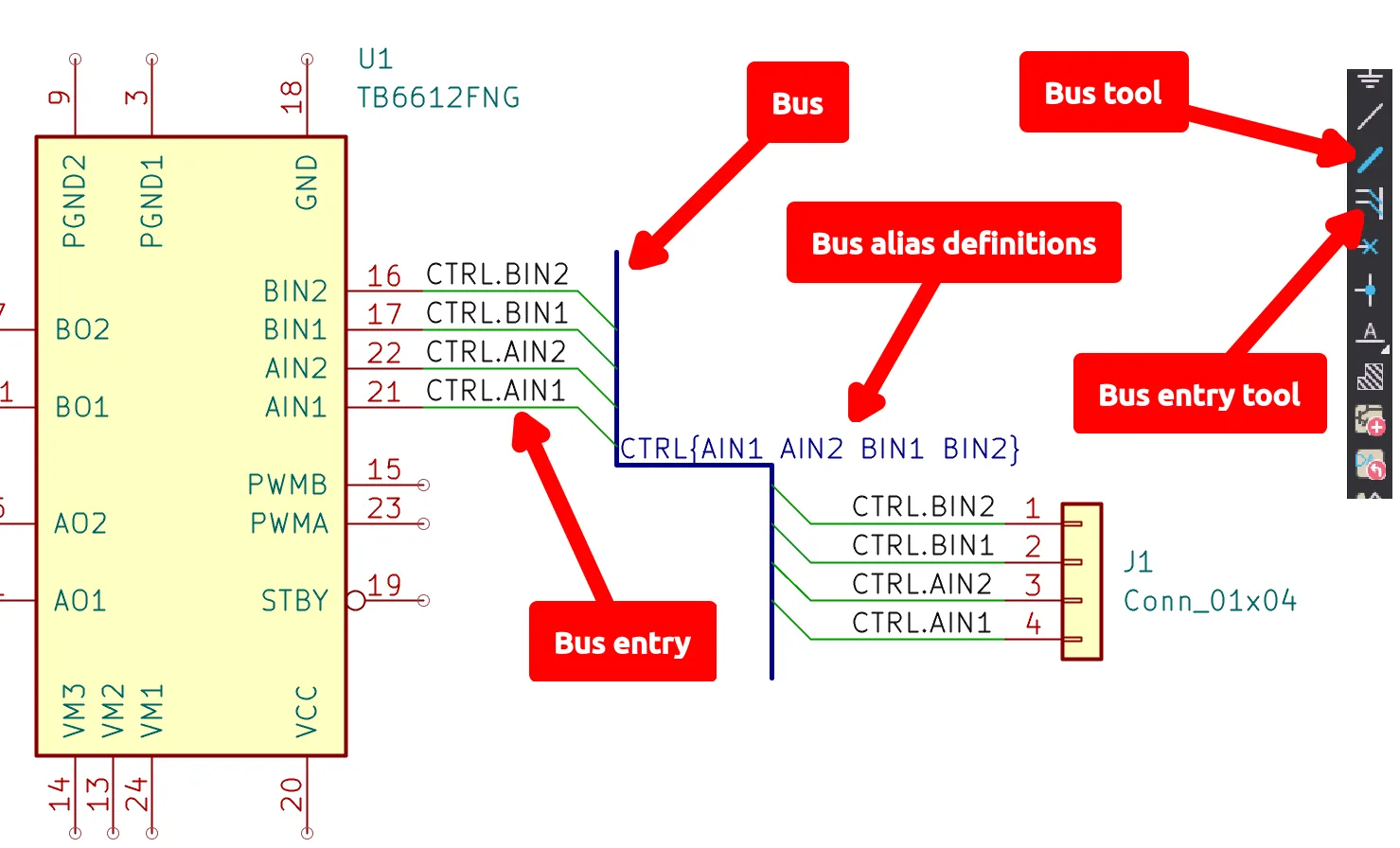
Figure 10.1: Four control lines gathered into a bus. The TB6612FNG’s AIN1, AIN2, BIN1, and BIN2 pins each leave through a bus entry onto the CTRL{AIN1 AIN2 BIN1 BIN2} bus and reappear at the Conn_01x04 header, connecting by name; because the group is named, the nets resolve to CTRL.AIN1 through CTRL.BIN2.
To draw a bus like that one, you use pieces you already know. Remember the net labels from Volume 1, where any two wires that carry the same name are joined by name? A bus operates on the same principle, and it essentially combines multiple net labels. Select the bus tool from the right toolbar to draw the bus as one thick line. Then, attach a label that lists its members. There are two forms of label that cover the two possible cases. When the members are numbered, as in a data bus, you use a range: a label of D[0..7] declares eight members from D0 to D7. When the members have their own unrelated names, as our control lines do, you wrap them in braces: a label of CTRL{AIN1 AIN2 BIN1 BIN2} declares a group of four.
Once the bus is drawn, you need to bring signals in and out of it. Drop a short diagonal ‘bus entry’ from the bus to a wire, and then put an ordinary net label with the member’s name on that wire; the “bus entry” tool sits on the same right toolbar. The bus entry is only a drawing, and the label is what makes the connection, so a wire you tag AIN1 where it joins the bus meets the pin you tag AIN1 where it leaves, however far the bus runs across the sheet. You cannot wire a pin straight onto the bus line, and KiCad ignores the attempt if you try, so every member reaches the bus through its own entry and label.
The group’s own name matters too, because KiCad prefixes each member’s net with it. For example, if you name the group CTRL, then the members of CTRL{...} become CTRL.AIN1, CTRL.AIN2, and so on. If you leave the group unnamed, as {AIN1 AIN2 BIN1 BIN2}, then the members keep their plain names.
Placing those entries and labels by hand, one signal at a time, is the kind of repetitive work KiCad’s ‘unfold’ tool spares you. To use the unfold tool, hover the cursor over the bus and press “C”, or right-click the bus and choose “Unfold from Bus”, and KiCad shows you a menu of the bus’s members. Pick one, and it draws the bus entry, the short wire, and the correctly-named label in a single motion, leaving you only to run the wire on to the pin. Because you choose the member from the bus’s own list instead of typing it, you can’t misspell it, so the unfold feature offers safety on top of convenience as an added benefit.
When a row of pins lines up neatly, the “Insert” key repeats the last item you placed and steps its number on as it goes, so a numbered bus like D[0..7] breaks out almost as fast as you can tap the key. If your keyboard has no “Insert” key, as many laptops and Mac keyboards do not, remember that “Insert” is only the default binding. To assign a different hotkey to this function, open “Preferences”, go to the “Hotkeys” page, find “Repeat Last Item,”.
So when should you reach for a bus, and when is a plain net label the better tool? Since the two are identical to the board, the choice is entirely about the person reading the sheet. A bus is preferable when signals genuinely belong together and travel together, like with a data bus, an address bus, the control lines to a driver, or the signals off a ribbon connector, and when drawing them one wire at a time would clutter the sheet or make the reader work to see that they are a set. The thick line signifies that these signals go as one. Reach for plain labels instead when the signals are few, when they don’t form a natural family, or when a single net just needs to jump across the sheet.
On the other hand, forcing unrelated signals into a bus is worse than drawing them as separate wires, because the bus implies a relationship that isn’t there, and you may potentially mislead the reader.
A good rule of thumb is to reach for a plain label by default, and to draw a group as a bus when the grouping is factual and the tidier sheet justifies the extra entries. On most sheets you end up with a bus or two for the obvious bundles and plain labels for the rest.